Showing posts with label Postgres. Show all posts

Tuesday, May 16, 2023

Dividing Number Return ZERO Postgres

 If you are also facing same issue, here is solution


EARLIER

select (15/20)
 
Output

0

NOW

use this command to get correct output in postgres

select (15/20::float)::numeric(5,2)

Output 

0.75 


you can Also  create function in database

CREATE OR REPLACE FUNCTION dvdrental1(part int, fullv int) RETURNS float AS $$
BEGIN
  RAISE NOTICE 'PROGRESS IN PERCENT : %', (part/fullv::float)::numeric(5,2);
  RETURN part/fullv::float;
END;
$$  LANGUAGE plpgsql VOLATILE
  COST 100;

Postgres DvdRental Sample Database Restore Error

I was facing error while restoring the database dvdrental for postgres. Postgres 9 was installed on my machine and connect as postgres user with database postgres.

First i tried to execute restore.sql script using pgadmin sql executor and throw below error:

ERROR:  syntax error at or near ''\''
LINE 35: \connect

SOLUTION
SQL need to execute on CMD, so open CMD and move to postgres installation directory

cd C:\Program Files\PostgreSQL\9.5\bin
>Enter

psql -h localhost -d postgres -U postgres -p 5432 -a -q -f C:\Users\userPostgres\Downloads\dvdrental\restore.sql


On Execution again faced error

psql:C:/Users/userPostgres/Downloads/dvdrental/restore.sql:920: ERROR:  could not open file "C:\Users\userPostgres\Downloads\dvdrental\3057.dat" for reading: Permission denied


COPY public.actor (actor_id, first_name, last_name, last_update) FROM stdin;
COPY public.actor (actor_id, first_name, last_name, last_update) FROM 'C:\Users\userPostgres\Downloads\dvdrental\3057.dat';
psql:C:/Users/userPostgres/Downloads/dvdrental/restore.sql:920: ERROR:  could not open file "C:\Users\userPostgres\Downloads\dvdrental\3057.dat" for reading: Permission denied
--
-- Data for Name: address; Type: TABLE DATA; Schema: public; Owner: postgres
--
COPY public.address (address_id, address, address2, district, city_id, postal_code, phone, last_update) FROM stdin;
COPY public.address (address_id, address, address2, district, city_id, postal_code, phone, last_update) FROM 'C:\Users\userPostgres\Downloads\dvdrental\3065.dat';
psql:C:/Users/userPostgres/Downloads/dvdrental/restore.sql:928: ERROR:  could not open file "C:\Users\userPostgres\Downloads\dvdrental\3065.dat" for reading: Permission denied
--
-- Data for Name: category; Type: TABLE DATA; Schema: public; Owner: postgres
--
COPY public.category (category_id, name, last_update) FROM stdin;
COPY public.category (category_id, name, last_update) FROM 'C:\Users\userPostgres\Downloads\dvdrental\3059.dat';
psql:C:/Users/userPostgres/Downloads/dvdrental/restore.sql:936: ERROR:  could not open file "C:\Users\userPostgres\Downloads\dvdrental\3059.dat" for reading: Permission denied
--
-- Data for Name: city; Type: TABLE DATA; Schema: public; Owner: postgres
--
COPY public.city (city_id, city, country_id, last_update) FROM stdin;
COPY public.city (city_id, city, country_id, last_update) FROM 'C:\Users\userPostgres\Downloads\dvdrental\3067.dat';
psql:C:/Users/userPostgres/Downloads/dvdrental/restore.sql:944: ERROR:  could not open file "C:\Users\userPostgres\Downloads\dvdrental\3067.dat" for reading: Permission denied
--
-- Data for Name: country; Type: TABLE DATA; Schema: public; Owner: postgres
--
COPY public.country (country_id, country, last_update) FROM stdin;
COPY public.country (country_id, country, last_update) FROM 'C:\Users\userPostgres\Downloads\dvdrental\3069.dat';
psql:C:/Users/userPostgres/Downloads/dvdrental/restore.sql:952: ERROR:  could not open file "C:\Users\userPostgres\Downloads\dvdrental\3069.dat" for reading: Permission denied
--
-- Data for Name: customer; Type: TABLE DATA; Schema: public; Owner: postgres
--
COPY public.customer (customer_id, store_id, first_name, last_name, email, address_id, activebool, create_date, last_update, active) FROM stdin;
COPY public.customer (customer_id, store_id, first_name, last_name, email, address_id, activebool, create_date, last_update, active) FROM 'C:\Users\userPostgres\Downloads\dvdrental\3055.dat';
psql:C:/Users/userPostgres/Downloads/dvdrental/restore.sql:960: ERROR:  could not open file "C:\Users\userPostgres\Downloads\dvdrental\3055.dat" for reading: Permission denied
--
-- Data for Name: film; Type: TABLE DATA; Schema: public; Owner: postgres
--
COPY public.film (film_id, title, description, release_year, language_id, rental_duration, rental_rate, length, replacement_cost, rating, last_update, special_features, fulltext) FROM stdin;
COPY public.film (film_id, title, description, release_year, language_id, rental_duration, rental_rate, length, replacement_cost, rating, last_update, special_features, fulltext) FROM 'C:\Users\userPostgres\Downloads\dvdrental\3061.dat';
psql:C:/Users/userPostgres/Downloads/dvdrental/restore.sql:968: ERROR:  could not open file "C:\Users\userPostgres\Downloads\dvdrental\3061.dat" for reading: Permission denied
--
-- Data for Name: film_actor; Type: TABLE DATA; Schema: public; Owner: postgres
--
COPY public.film_actor (actor_id, film_id, last_update) FROM stdin;
COPY public.film_actor (actor_id, film_id, last_update) FROM 'C:\Users\userPostgres\Downloads\dvdrental\3062.dat';
psql:C:/Users/userPostgres/Downloads/dvdrental/restore.sql:976: ERROR:  could not open file "C:\Users\userPostgres\Downloads\dvdrental\3062.dat" for reading: Permission denied
--
-- Data for Name: film_category; Type: TABLE DATA; Schema: public; Owner: postgres
--
COPY public.film_category (film_id, category_id, last_update) FROM stdin;
COPY public.film_category (film_id, category_id, last_update) FROM 'C:\Users\userPostgres\Downloads\dvdrental\3063.dat';
psql:C:/Users/userPostgres/Downloads/dvdrental/restore.sql:984: ERROR:  could not open file "C:\Users\userPostgres\Downloads\dvdrental\3063.dat" for reading: Permission denied
--
-- Data for Name: inventory; Type: TABLE DATA; Schema: public; Owner: postgres
--
COPY public.inventory (inventory_id, film_id, store_id, last_update) FROM stdin;
COPY public.inventory (inventory_id, film_id, store_id, last_update) FROM 'C:\Users\userPostgres\Downloads\dvdrental\3071.dat';
psql:C:/Users/userPostgres/Downloads/dvdrental/restore.sql:992: ERROR:  could not open file "C:\Users\userPostgres\Downloads\dvdrental\3071.dat" for reading: Permission denied
--
-- Data for Name: language; Type: TABLE DATA; Schema: public; Owner: postgres
--
COPY public.language (language_id, name, last_update) FROM stdin;
COPY public.language (language_id, name, last_update) FROM 'C:\Users\userPostgres\Downloads\dvdrental\3073.dat';
psql:C:/Users/userPostgres/Downloads/dvdrental/restore.sql:1000: ERROR:  could not open file "C:\Users\userPostgres\Downloads\dvdrental\3073.dat" for reading: Permission denied
--
-- Data for Name: payment; Type: TABLE DATA; Schema: public; Owner: postgres
--
COPY public.payment (payment_id, customer_id, staff_id, rental_id, amount, payment_date) FROM stdin;
COPY public.payment (payment_id, customer_id, staff_id, rental_id, amount, payment_date) FROM 'C:\Users\userPostgres\Downloads\dvdrental\3075.dat';
psql:C:/Users/userPostgres/Downloads/dvdrental/restore.sql:1008: ERROR:  could not open file "C:\Users\userPostgres\Downloads\dvdrental\3075.dat" for reading: Permission denied
--
-- Data for Name: rental; Type: TABLE DATA; Schema: public; Owner: postgres
--
COPY public.rental (rental_id, rental_date, inventory_id, customer_id, return_date, staff_id, last_update) FROM stdin;
COPY public.rental (rental_id, rental_date, inventory_id, customer_id, return_date, staff_id, last_update) FROM 'C:\Users\userPostgres\Downloads\dvdrental\3077.dat';
psql:C:/Users/userPostgres/Downloads/dvdrental/restore.sql:1016: ERROR:  could not open file "C:\Users\userPostgres\Downloads\dvdrental\3077.dat" for reading: Permission denied
--
-- Data for Name: staff; Type: TABLE DATA; Schema: public; Owner: postgres
--
COPY public.staff (staff_id, first_name, last_name, address_id, email, store_id, active, username, password, last_update, picture) FROM stdin;
COPY public.staff (staff_id, first_name, last_name, address_id, email, store_id, active, username, password, last_update, picture) FROM 'C:\Users\userPostgres\Downloads\dvdrental\3079.dat';
psql:C:/Users/userPostgres/Downloads/dvdrental/restore.sql:1024: ERROR:  could not open file "C:\Users\userPostgres\Downloads\dvdrental\3079.dat" for reading: Permission denied
--
-- Data for Name: store; Type: TABLE DATA; Schema: public; Owner: postgres
--
COPY public.store (store_id, manager_staff_id, address_id, last_update) FROM stdin;
COPY public.store (store_id, manager_staff_id, address_id, last_update) FROM 'C:\Users\userPostgres\Downloads\dvdrental\3081.dat';
psql:C:/Users/userPostgres/Downloads/dvdrental/restore.sql:1032: ERROR:  could not open file "C:\Users\userPostgres\Downloads\dvdrental\3081.dat" for reading: Permission denied


SOLUTION
1. Check Directory permission (read,write) to window user
2. Change "dvdrental" directory to some another drive, i moved folder to E drive, now path is as below, Also dont forget to change the path within the restore.sql file


psql -h localhost -d postgres -U postgres -p 5432 -a -q -f E\dvdrental\restore.sql


Tuesday, February 14, 2023

Find Deadlock query and Kill the Process in Postgres

If your query took longer and never ending then possibility tables are under deadlock. You can easily identify the deadlock in postgres and kill the lock.

SELECT * FROM pg_locks pl LEFT JOIN pg_stat_activity psa ON pl.pid = psa.pid where state= 'active'

    
Find the records which are under deadlock

select
    pid, state, usename, query, query_start
from
    pg_stat_activity
where
    pid in
    (
        select
            pid
        from
            pg_locks pgl
            join pg_class pgc on pgl.relation = pgc.oid
        where
            pgc.relkind = 'r'
            and pgc.relname = 'your_table'
    );


Observe the query output and identify your queries causing deadlock.

Then Kill the ProcessID's one by one

SELECT pg_cancel_backend(0001);


if Deadlock still there, your PID still visible in pg_locks table then use below query

select pg_terminate_backend(0001)


Friday, May 22, 2020

pg_dump Postgres Backup Restore Error

This is new error i faced while taking backup of database from Postgres.

setup-
1. Server A -> Location ABC -> Postgres Server version - 9.6.18
2. Machine B -> Location EDF -> Postgres Server version - 9.5.3

I created connection of Server A from machine B and initiate backup from machine B of Server A database. My intention was to bring down the server database to another machine. 

In Postgres it is possible to create copy of backup at your local machine (machine B), if database is installed on another machine (as compare to in SQLServer it is not possible).

When i started taking backup, it throw below error:

pg_dump: server version: 9.6.11; pg_dump version: 9.5.3
pg_dump: aborting because of server version mismatch

Process returned exit code 1.
So, here i do not have option to install or re-install postgres of version 9.6.11 on my machine.

So what i did, postgres is open source, i get the pg_dump.jar file and pg_restore.jar file of version 9.6.11 and replaced the actual file of version 9.5.3.

Note* - take backup of pg_dump/pg_restore of 9.5.3 postgres install.
It is available in C directory of  postgres/version /bin

Now take backup and restore it will work!!

Wednesday, March 25, 2015

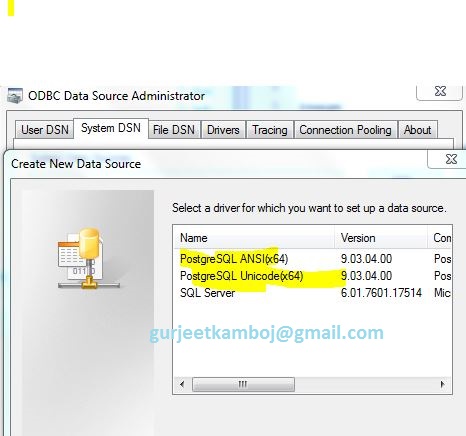
Install PostgreSQL ODBC drivers in Windows

If you are trying to create User DSN/ System DSN in ODBC drivers and suddenly you found that ODBC driver string is missing.


image 1 - machine not have postgres odbc driver

When you want to connect any third party tool with postgres SQL database, you have to create odbc DSN.

Installing the PostgreSQL ODBC drivers:
way 1:
Download msi package to install odbc from below link
http://www.postgresql.org/ftp/odbc/versions/msi/

Unzip the package and let it install and finish.
way 2:
Download postgres db package
after installation it will ask for
"Stack builder and additional tools" - check this option and  select add-on package "jdbc".

Saturday, February 28, 2015

alphanumeric sort in postgres

alphanumeric sort in postgres

one day i have identify that postgres is behaving abnormally while sorting of alphanumeric column. I googled it alot and reach at decision that postgres not able to do natural sort of mix type words.
generally it give sort order like 1,1a, 10 , 2a, 2b, 30

as per natural sort it should be like 1, 1a, 2a, 2b, 10, 30

i tried with different datatype but behaviour remain same.

the solution is create a function, which will return natural sort

create table test_sort (column1 varchar);
insert into test_sort valuepad_numberss ('032');
insert into test_sort valuepad_numberss ('2a');
insert into test_sort valuepad_numberss ('01');
insert into test_sort valuepad_numberss ('1b');
insert into test_sort valuepad_numberss ('1c');
insert into test_sort valuepad_numberss ('1d');
insert into test_sort valuepad_numberss ('2');
insert into test_sort valuepad_numberss ('32t');
insert into test_sort valuepad_numberss ('4');
insert into test_sort valuepad_numberss ('28k');
insert into test_sort valuepad_numberss ('001');
insert into test_sort valuepad_numberss ('1a');
insert into test_sort valuepad_numberss ('40');
insert into test_sort valuepad_numberss ('1');

select * from test_sort order by 1
\


CREATE FUNCTION pad_numbers(text) RETURNS text AS $$
  SELECT regexp_replace(regexp_replace(regexp_replace(regexp_replace($1,
    E'(^|\\D)(\\d{1,3}($|\\D))', E'\\1000\\2', 'g'),
      E'(^|\\D)(\\d{4,6}($|\\D))', E'\\1000\\2', 'g'),
        E'(^|\\D)(\\d{7}($|\\D))', E'\\100\\2', 'g'),
          E'(^|\\D)(\\d{8}($|\\D))', E'\\10\\2', 'g');
$$ LANGUAGE SQL;


select * from test_sort order by pad_numbers(column1);

Saturday, October 4, 2014

string search in database postgres

I created a search string function in postgres, thru which we can search string in a database table having column datatype 'character', 'character varying', 'text'.

According to the requirement we can add more datatype to vast your search or you can cut down the data-type to narrow your search.

This is one requirement, which is covered.
Now using same function we can learn below topic
  • for loop in postgres
  • dynamic execution in postgres (EXECUTE)
  • return record set using function using SETOF
    •  To achieve this i learn that how to return multiple row (record set) from a function, i.e what i want to share with all of you guy
                    First of all we need to use SETOF with return keyword, second is need to declare a variable having record datatype. third is Need to use RETURN NEXT in for loop - it will return the rows to outer RETURN, which is earlier declared.

drop function seing(char(50))

CREATE OR REPLACE FUNCTION seing(str char(50))
RETURNS setof  character varying AS
$BODY$
DECLARE
    tempCount bigint ;
    record_v record;
    query text;
BEGIN
    query:= 'select table_name ,column_name from information_schema.columns where table_schema = ''public'' and
        data_type in (''character'',''character varying'',''text'')';
    FOR record_v IN EXECUTE query LOOP
        EXECUTE 'select count(*) as a from ' || quote_ident(record_v.table_name) || ' where ' || quote_ident(record_v.column_name ) || ' like ''%'||str ||'%'';' into tempCount;
        --RAISE NOTICE 'loop test .. it is working fine';
        return next record_v.table_name ||'    '   ||record_v.column_name  || '   '||tempcount ;
        --return   record_v.table_name ||' '||record_v.column_name;
    END LOOP;
return;
END;
$BODY$ LANGUAGE plpgsql VOLATILE
COST 100;

select seing('tbsp')


Friday, October 3, 2014

ERROR: cannot change return type of existing function

Error faced
ERROR:  cannot change return type of existing function
HINT:  Use DROP FUNCTION first.


this error generally comes when you trying to recreate the function having its RETURN TYPE value changed.

CREATE OR REPLACE FUNCTION seing(str char(50)) RETURNS TABLE (a varchar, b varchar) AS
$BODY$
DECLARE
.....


ERROR:  cannot change return type of existing function
HINT:  Use DROP FUNCTION first.

********** Error **********

ERROR: cannot change return type of existing function
SQL state: 42P13
Hint: Use DROP FUNCTION first.


Solution
drop function using drop command as below


drop function seing(char(50));

This is worked fine at my end. If you face the above error in future then always drop the function
as above command and
function name should contain the datatype as define in previous function.

Sunday, September 28, 2014

Execute postgres SQL script on cmd

To need restore database using sql file we need to execute , run the sql file with the help of cmd.

open postgres
    create database.
open cmd
    move to the bin folder of postgres
    cd C:\Program Files\PostgreSQL\9.1\bin

    then execte the command
    C:\Program Files\PostgreSQL\9.1\bin>psql -U postgres -d usda -a -f C:\Users\gurjeet\Desktop\usda.sql

Sunday, December 1, 2013

Postgres Create drop constraint script with the help of function


Create drop script for constraints in postgres sql :

CREATE or REPLACE FUNCTION fn_get_fk(tbl_name varchar, col_name varchar) RETURNS varchar
language PLPGSQL AS $$
DECLARE
   Vtbl varchar(150);
   Vqrys varchar(150);
   Vcol varchar(150);
   Vcon varchar(150);
   Vqryd varchar(300);
   Vqrya varchar(300);
   Vsch varchar(150);
   VqryAdd varchar(30000) = '';
   VqryDrp varchar(30000) = '';
   Vrtn varchar;

   Ctbl_list refcursor;
   Ctblcon information_schema.table_constraints %rowtype;
   Vtblkcu information_schema.key_column_usage;
BEGIN
-- OPEN CURSOR WITH REFERENCING TABLE FOR GIVEN PARENT TABLE
 open Ctbl_list for execute 'SELECT *
    FROM information_schema.table_constraints tc
    right JOIN information_schema.constraint_column_usage ccu
    ON tc.constraint_catalog = ccu.constraint_catalog
      AND tc.constraint_schema = ccu.constraint_schema
      AND tc.constraint_name = ccu.constraint_name
      and ccu.table_name in ('||quote_literal(tbl_name)||')
      and ccu.column_name in ('||quote_literal(col_name)||')
    WHERE lower(tc.constraint_type) in (''foreign key'');' ;
 loop fetch next from Ctbl_list into Ctblcon ;
 exit when not found;
    Vtbl = Ctblcon.table_name;
    Vcon = Ctblcon.constraint_name;
    Vsch = Ctblcon.constraint_schema;
--GENERATE DROP CONSTRAINT STATEMENT
    Vqryd = 'alter table '|| Vsch||'.'||Vtbl ||' drop constraint ' || Vcon;
    VqryDrp = VqryDrp ||';'||chr(10)||Vqryd;
    raise info 'Qry : %; ',Vqryd;
--GET REFRENCING COLUMN NAME
    Vqrys = 'select * from information_schema.key_column_usage where constraint_name='||quote_literal(Vcon) ;
  EXECUTE Vqrys into Vtblkcu;
-- GENERATE ADD CONSTRAINT STATEMENT
Vqrya = 'alter table '|| Vsch||'.'||Vtbl ||' add constraint ' || Vcon ||' foreign key('||Vtblkcu.column_name||')
references personal.m_pis_master(str_empno)';
raise notice 'add constraint : %; ',Vqrya;
VqryAdd = VqryAdd || chr(10) || Vqrya || ';';
end loop;
-- CONCATENATE BOTH ADD & DROP STATEMENT
Vrtn ='DROP CONSTRAINT : '|| VqryDrp ||chr(10)||'ADD CONSTRAINT : '||chr(10)||VqryAdd;
RETURN Vrtn;
END;
$$; 
 
Execute the above function by adding table and its column name on which we need to find the dependency
SELECT * FROM fn_get_fk('language','language_id')

This script will be helpful in finding parent child relationship of tables depending foreign keys or you can modify the function accordingly.......................

Saturday, October 13, 2012

Forgot username password of POSTGRES

Look for pg_hba.conf file in installtion directory
C:\Program Files\PostgreSQL\9.1\data\pg_hba.conf

edit this file below:
(replace md5 with trust)
# TYPE DATABASE USER ADDRESS METHOD

# IPv4 local connections:
host         all          all                127.0.0.1/32            trust
# IPv6 local connections:
host         all          all                ::1/128                     trust


restart the service


login annd enjoy


web stats